
Marina Pro — full facility management software built only for marinas.
Marina Pro is the operations spine for a working marina. Work orders for every trade — electrical, plumbing, asphalt, concrete, dock-side structural — full slip reservations, slip-to-slip customer moves, a complete financial ledger, and a live asset register for the whole harbor. One system. Built by marina builders.
- SLIPS Reservations & moves
- TRADES Work orders, all of them
- LEDGER Full marina accounting
- BUILT BY The team that built the marina
A live look at the operations dashboard.
The harbor map, slip board, severity-coded inspections, and work-order pipeline — all in one view. This is what your dockmasters, GMs, and dispatch will look at every day.
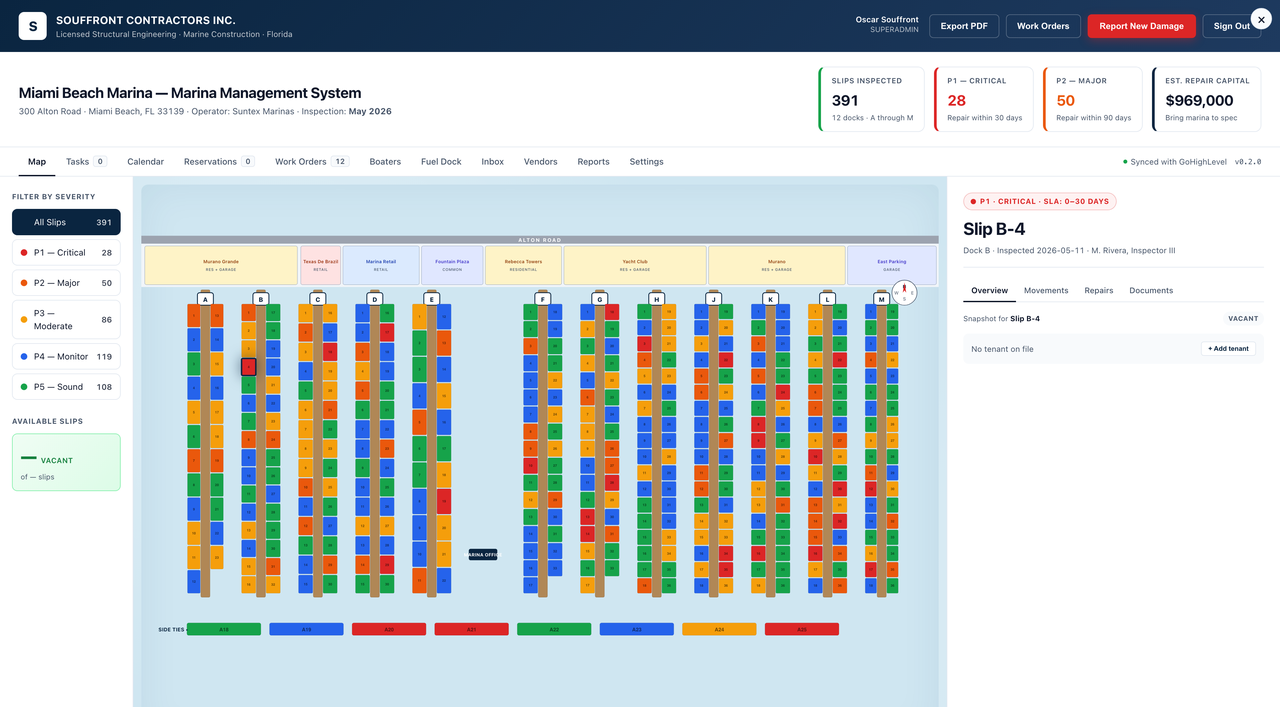
The whole harbor.
One screen.
Every slip, color-coded by inspection severity. P1 critical → P5 good. Click any slip for the full work-order panel — vessel, tenant, condition history, and the next move. The harbor map is the home screen and the dispatch tool, in one view.
- Drag-and-drop slip-to-slip moves
- Filter by severity, draft, beam, contract type
- Live status — vacant, held, out of service, storm-evacuated
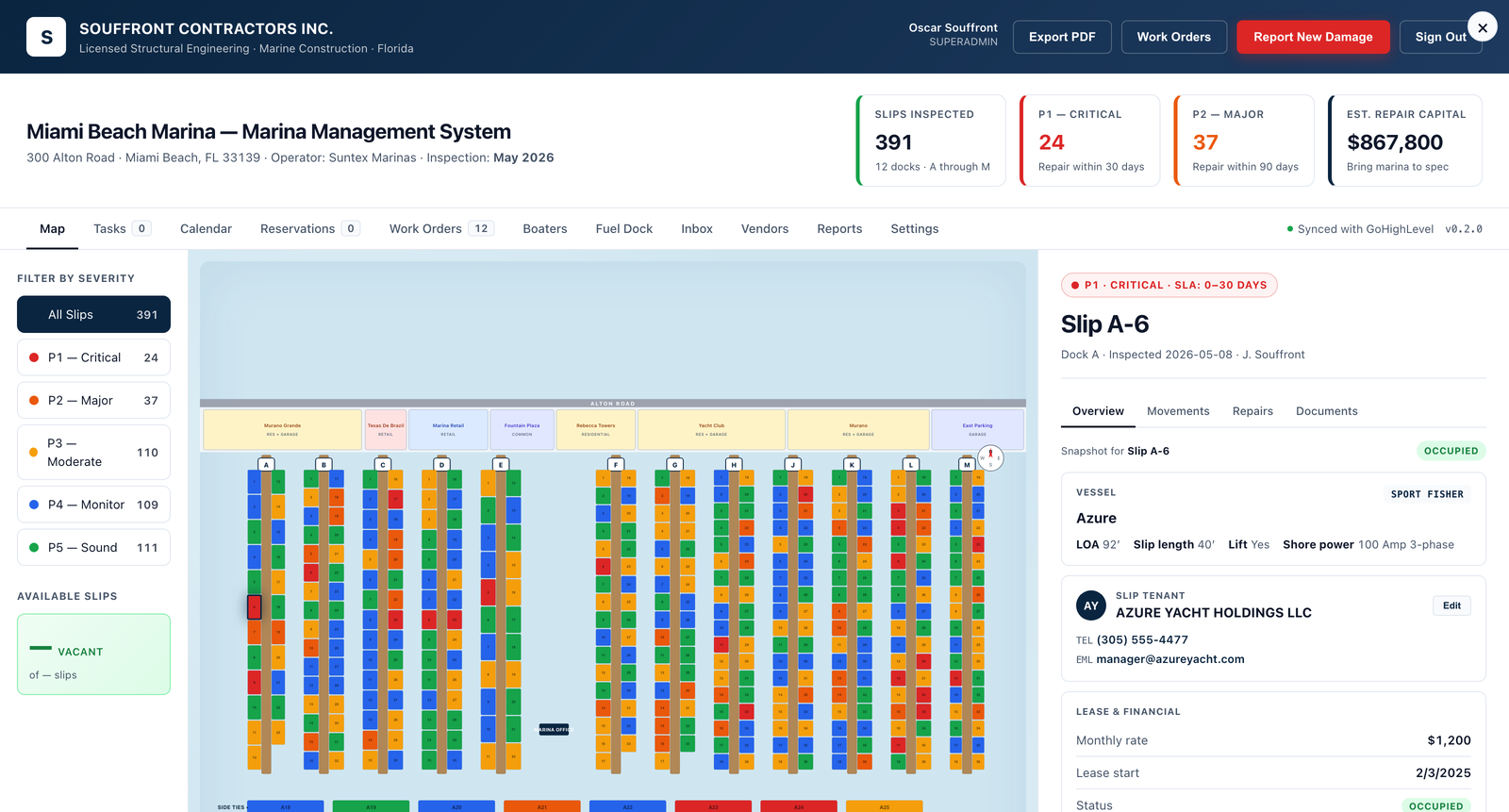
Every marina trade.
One vendor table.
Electrical, plumbing, asphalt, structural, lift service, diving, painting — every contractor your marina runs on is in one place, with license + COI on file and open work orders by trade. Work orders auto-route to the right vendor the moment they're opened.
- Auto-routing by trade type
- COI + license expiration tracking
- Per-vendor portal — they see only their assigned work
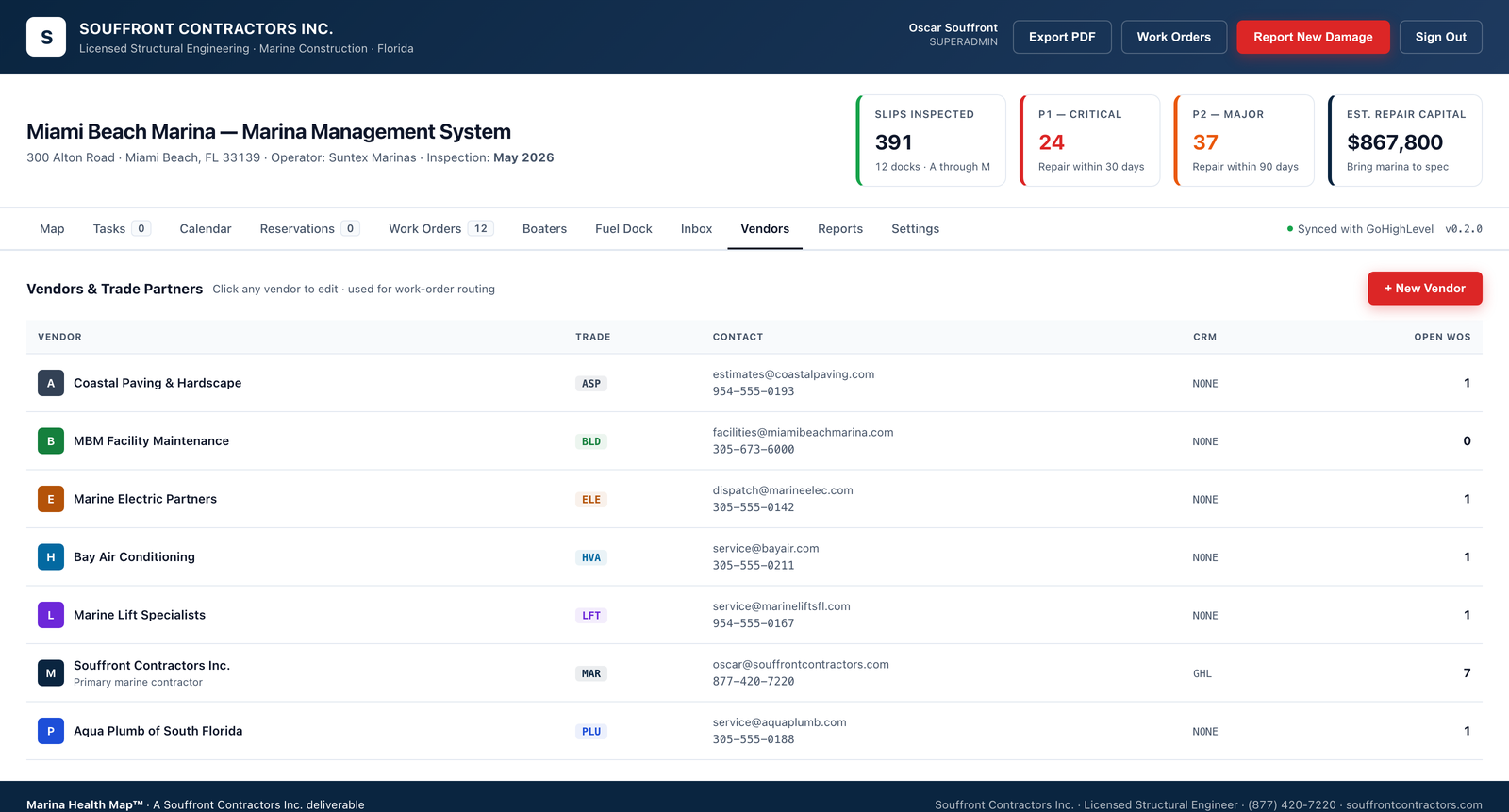
Capital planning,
in one number.
Estimated repair capital, deferred-maintenance backlog, revenue per slip-foot, occupancy curves, vendor spend by trade. The reports your board wants, generated — not assembled. Storm-readiness snapshot freezes the queue the moment the harbor enters storm mode.
- Real-time capital projection updated by every closed inspection
- Board-ready monthly packets — exportable PDF
- Trade spend, vendor performance, slip yield
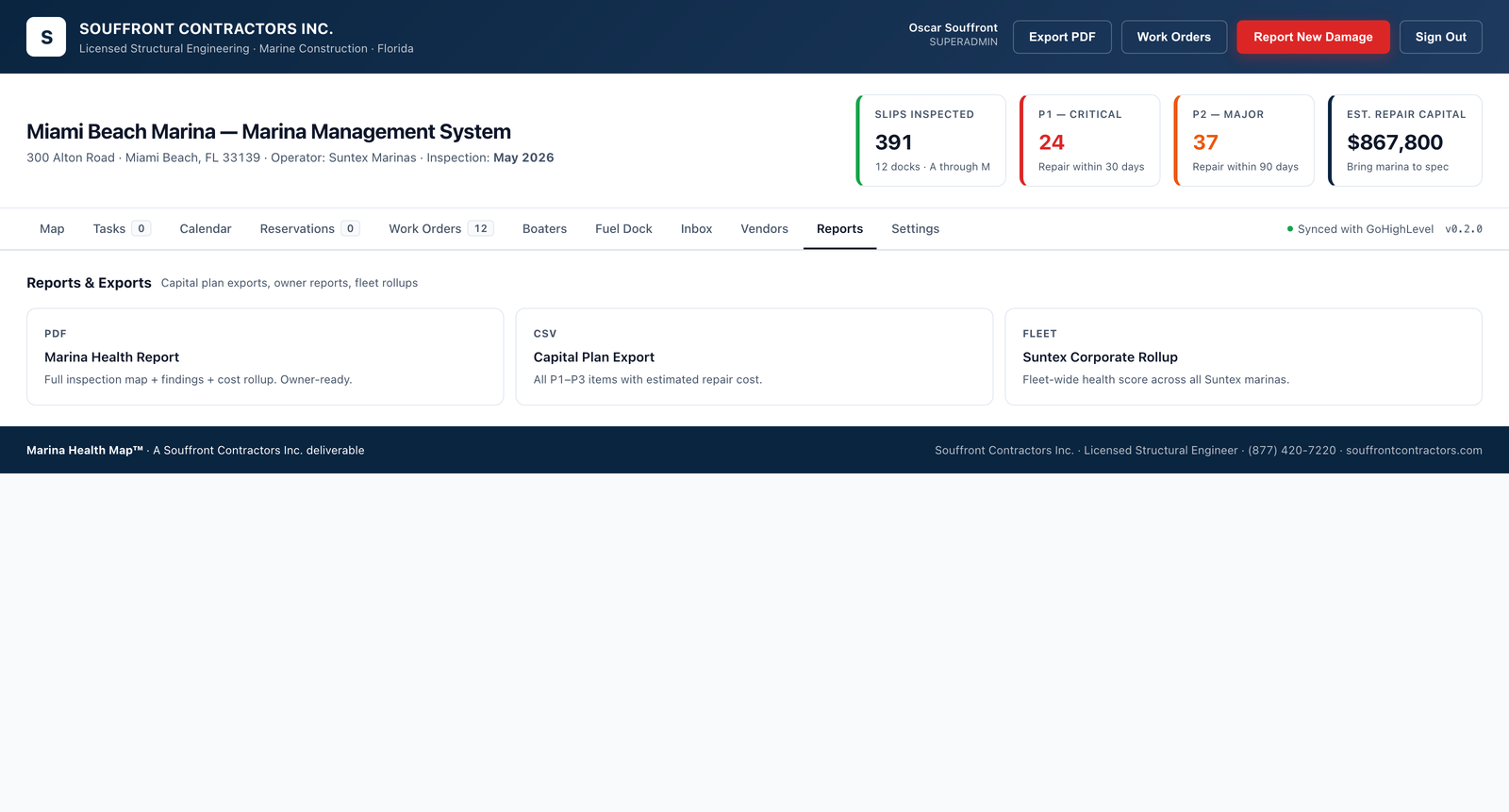
The way a harbor master
actually books a slip.
Transient bookings, annual contracts, waitlists, deposits, refunds, season changeovers. Hold-then-charge workflow with rules a dockmaster can actually edit. Online, walk-up, or phone — every channel writes to the same record. No double-bookings, no spreadsheet drift.
- Vessel-fit check on every booking (beam, draft, utility)
- Bulk season changeover in one operation
- Waitlist invitations with first-right-of-refusal timers
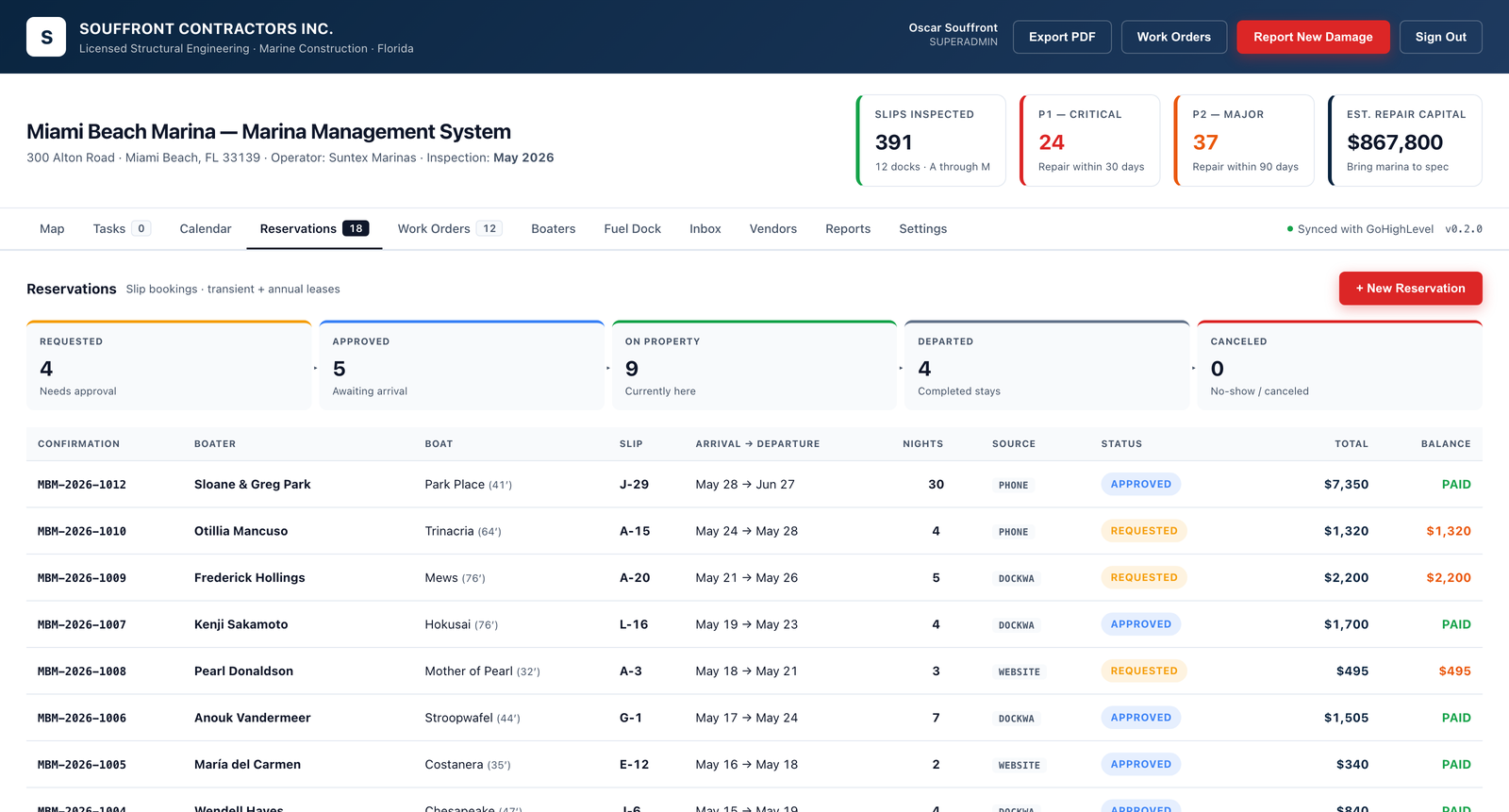
A glimpse of what's inside.
Eleven tabs across the top of every Marina Pro screen — harbor map, work orders, vendors, reservations, reports, fuel dock, inbox, and more. Every view operates on the same single source of truth: your marina.
Why we built Marina Pro
Marina Pro exists because we have spent years inside South Florida marinas — building their docks, repairing their seawalls, restoring their concrete, and inspecting their structures — and in marina after marina we saw the same problem: the operation runs on memory, not on a system.
Contractors arrive without a clear scope. Damage that was photographed on Monday cannot be located by Thursday. A vessel is moved out of a slip so structural work can be performed, and three days later nobody is certain whether the slip was ever returned to service. Before-and-after photos live on a dockmaster's phone, on a contractor's email thread, and on a property manager's text history — and none of those records talk to each other. When the general manager asks a straightforward question — what is the current condition of the harbor, what work is open against it, and what did we do about it last quarter — the answer requires three phone calls and a folder of loose paperwork.
Marina Pro was engineered to fix that. It is a single system of record for every piece of work performed in the marina, every photograph captured of damage and of repair, every vessel move made so that work could be carried out, and every contractor interaction that supports the harbor. Documentation is not a side effect of using Marina Pro — it is the product. Every work order opens with a photo set, closes with a photo set, and writes both to the permanent asset record automatically.
The result is that the general manager, the dockmasters, and the dock-side employees are all looking at the same picture of the harbor at the same time. The GM sees the full operation from one dashboard — open work, completed work, damage register, contractor activity, slip movements, and financial impact. The dockmaster sees the slips, the moves, the inbound work, and the daily walk. The employees see their assignments and the photos that prove they were done. Nobody is left guessing what was repaired, what is still open, where the boat went while the cap was being poured, or which contractor took the last set of before-and-after photos. The marina runs from one accountable record, and everyone authorized to see it sees the same thing.
What's in the platform
Marina Pro ships as a single integrated platform. Eight modules, one database, one login, one ledger.
Work orders for every marina trade
The maintenance module is the heart of Marina Pro. A marina is a small infrastructure portfolio that needs every trade an apartment building needs — and several that no apartment building has. Marina Pro issues, routes, and closes work orders across every one of them:
Every work order is tied to an asset, a slip (where relevant), a customer (where billable), a trade, a priority, and a financial line. Work orders can be assigned to in-house staff, to a preferred-vendor pool, or — when the work calls for it — directly to Souffront Contractors as the licensed marine contractor of record.
The system tracks every order from creation through dispatch, on-site, photos and notes, signed completion, invoice, and ledger entry. Aging dashboards surface anything that has been open longer than the trade's SLA. Storm checklists snapshot the entire open backlog and freeze it the moment the harbor enters storm mode.
Slips, reservations, and slip-to-slip moves
Marina Pro models the harbor the way a dockmaster looks at it. The slip board is a live map of the marina with every slip rendered to scale, color-coded by status: occupied, vacant, held, transient, out-of-service, or storm-evacuated. From the board, the dockmaster can:
- Move a customer from one slip to another by dragging the vessel tile to the new slip. The system re-checks beam, draft, and utility class, prorates the contract, generates the move letter, and posts the GL entries.
- Hold a slip for an inbound transient, a haul-out, or a contract negotiation, with an expiry that auto-releases if the deposit isn't paid.
- Take a slip out of service when it's tied to an open structural work order, and prevent any reservation logic from re-booking it.
- Run season changeovers in a single bulk operation: end annual contracts, roll renewing customers, open seasonal inventory, and re-price by class.
- Issue a wait-list invitation when a contract closes or a vessel size changes, with first-right-of-refusal timers and audit logging.
Bookings come in through a branded marina website, a walk-up kiosk at the harbor office, or a phone call captured by the dockmaster — and every channel writes to the same record. Customers see only what concerns them; staff see the whole harbor.
A real marina ledger — not a bolt-on
Marina Pro ships with a full double-entry ledger purpose-built for marina accounting. Every reservation, every utility charge, every fuel sale, every work order, and every move generates the right journal entries automatically. The accounting team sees:
- A live AR aging by customer and by slip class.
- A revenue-per-slip-foot dashboard tracked over rolling periods.
- Deposits, hold accounts, and refund liabilities reconciled nightly.
- Trade spend by vendor, by asset class, and by slip — so deferred maintenance is visible before it becomes capital expenditure.
- Sales tax, sovereign-submerged-lands lease accruals, and use-tax where applicable.
- Native exports to QuickBooks Online, Sage Intacct, and NetSuite. CSV and journal-entry exports for everyone else.
Asset register
Every physical thing in the harbor is in the asset register: each float section, each guide pile, each pedestal, each gangway, each pump-out station, each fuel pump, each gate, each light, each utility riser. Marina Pro is designed to inherit the asset register directly from the as-built drawings of the marina build — so on the day commissioning closes, the maintenance system is already populated.
Every asset carries a service history, a warranty file, the engineer's design data sheet, the photo set from acceptance, a remaining-life estimate, and an inspection schedule. When a work order closes against an asset, the asset's service history updates in real time — and the remaining-life curve adjusts.
Integrations — the stack you already run
Marina Pro is built to live inside the tools your office already uses. Accounting, dock management, BI dashboards, payments, marketing — every system on this page has a one-click connector in the Settings → Integrations panel, plus a documented REST API and outbound webhooks for everything else.
Accounting
- QuickBooks Online — two-way sync of customers, invoices, payments, and chart of accounts.
- QuickBooks Desktop — push invoices, deposits, and customers via the QuickBooks Web Connector (Pro, Premier, and Enterprise).
- Xero, Sage Intacct, NetSuite — native exports plus journal-entry CSV.
Dock & marina operations
- SpeedyDock — two-way launch-schedule sync for dry-stack and rack-storage marinas.
- Molo — pull reservations, rates, and boater accounts from Molo into Marina Pro.
- Dockwa — import transient reservations and push live slip availability.
- Marina Office — pull customer accounts and metered utility reads from legacy installs.
Business intelligence & reporting
- Microsoft Power BI — stream slips, work orders, vendor spend, and revenue into a Power BI dataset for board-ready dashboards.
- Google Looker Studio — live connector against the Marina Pro reporting tables.
- Tableau — publish extracts to Tableau Cloud or Server via the Web Data Connector.
Payments
- Stripe, Square, Authorize.net — auto-charge boaters for slip rent, repairs, and fuel; in-person card readers for the harbor office.
CRM, marketing & automation
- GoHighLevel, HubSpot, Mailchimp — sync boaters as contacts, slip activity as engagement events, and segment by tier or balance for campaigns.
- Zapier and Make — connect to 6,000+ apps with no code. Triggers on new work order, slip status change, payment received, contract signed.
Hardware & site systems
- Smart pedestals: native metering with the leading marina-grade pedestal vendors; metered-manually fallback for legacy hardware.
- Fuel-management: most marina fuel-management systems via the standard POS bridge.
- Storage & docs: Google Drive and Dropbox mirrors for inspection PDFs and work-order photos.
- Customer comms: branded email, Twilio SMS, SendGrid transactional, and storm-mode push notifications.
- Single sign-on: Google, Microsoft 365, Okta for marinas under HOA or hospitality umbrellas.
Build your own — REST API & webhooks
Don't see your system on the list? Every Marina Pro tenant gets scoped API keys and outbound webhooks out of the box. Trigger external systems when a work order is created, a slip changes status, a payment posts, or a contract is signed — and read or write any operational record with a documented REST endpoint. If the connector isn't already built, you can either request it from the Souffront integrations team or build it yourself in an afternoon.
Onboarding
Marina Pro is engineered to be live on the day commissioning closes for a new build — and to migrate cleanly for an existing marina. Two onboarding tracks:
New-build onboarding
When Souffront builds your marina, Marina Pro onboarding runs in parallel with construction. As-built drawings load into the asset register, every pedestal and slip is bar-coded into the maintenance system, customer pre-leases load into the ledger, and the first work-order cycle runs alongside the commissioning punch list. Harbor opens with the software live.
Existing-marina migration
For operating marinas migrating off a legacy stack, our onboarding team will model the harbor from your CAD, import your customer and vessel records, reconcile your AR opening balances, and run the parallel ledger for one billing cycle. Typical migrations close in 6 to 10 weeks. We do not require you to rebuild your asset register from scratch — we'll do it from your existing files.
Pricing
Marina Pro is priced per slip per month, with a transparent fixed onboarding fee. No per-user surcharge, no transaction skim on payments, no module unlocks.
| Tier | Best for | Per slip / month |
|---|---|---|
| Marina Pro · Core | HOA harbors and community docks under 60 slips | $18 – $28 |
| Marina Pro · Commercial | Commercial marinas 60 – 300 slips | $14 – $20 |
| Marina Pro · Enterprise | Multi-property operators and 300+ slip harbors | By proposal |
| Onboarding (new build) | Included with Souffront Contractors build | Included |
| Onboarding (migration) | Existing marina, off another platform | $8,500 – $24,000 one-time |
All tiers include unlimited users, unlimited work orders, full ledger, full asset register, and unlimited support. Hardware integration may carry a one-time per-pedestal cost; quoted on the migration proposal.
See Marina Pro in your harbor.
Book a 45-minute walkthrough with a Souffront operator. We'll show you slip moves, work-order routing, the ledger, and the storm-mode dashboard — using a sample harbor sized to yours. Already a customer? Log in below.
Marina Pro FAQ
Yes. Marina Pro is not a generic CMMS or vacation-rental tool with marina add-ons. Every concept in the product — slip, finger, pile, pedestal, work order, ledger entry — is modeled the way a marina actually uses it. It's written by the team that designs, builds, and inspects marinas for a living, and it cannot be repurposed for an apartment building or a self-storage facility.
Yes — electrical, plumbing, asphalt, concrete, structural, diving, painting, hardware, welding, fire, landscape, and janitorial all ship as first-class trades. Work orders can be assigned to in-house staff, a preferred-vendor pool, or routed directly to Souffront Contractors as the licensed marine contractor of record.
From the live slip board, the dockmaster drags a vessel tile to a new slip. The system re-checks beam, draft, and utility class, prorates the customer's contract, generates the move letter, posts the journal entries to the ledger, and re-flags any open work orders against the old slip. The whole operation is one drag.
It includes a full double-entry ledger purpose-built for marina accounting and can run as your system of record, but it also exports natively to QuickBooks Online, Sage Intacct, and NetSuite. Most of our customers run Marina Pro as the operational ledger and sync to their corporate GL on a nightly cadence.
For a new marina that Souffront builds, the platform is live the day commissioning closes — onboarding runs in parallel with construction. For an existing marina migrating off a legacy stack, typical migrations close in 6 to 10 weeks, including customer import, AR reconciliation, asset-register population from your CAD, and a one-cycle parallel ledger run.
No. Marina Pro integrates natively with the leading marina-grade smart pedestals for automated metering, but it supports manual meter reads for legacy hardware. You can upgrade incrementally and the software adapts as you go.
Marina Pro ships with one-click connectors for QuickBooks Online and QuickBooks Desktop (via Web Connector), SpeedyDock, Molo, Dockwa, Microsoft Power BI, Google Looker Studio, Tableau, Stripe, Square, Authorize.net, GoHighLevel, HubSpot, Mailchimp, Zapier, Make, Google Drive, Dropbox, Twilio SMS, and SendGrid. SSO is supported via Google, Microsoft 365, and Okta. Everything else can be wired up through scoped REST API keys and outbound webhooks — there's no extra fee for using the API.
Per slip per month, with a transparent fixed onboarding fee. Unlimited users, unlimited work orders, full ledger, full asset register, and unlimited support are included in every tier. There is no per-user surcharge, no transaction skim on customer payments, and no module unlocks.
Your data is yours. Marina Pro offers a one-click full export at any time: customers, vessels, slip history, ledger, work orders, assets, and document attachments. Export is offered in standard CSV and JSON formats; there is no exit fee and no contractual lock-in beyond the term you signed.